ip
TaskBot
TaskBot is a desktop application for managing your tasks efficiently. It allows you to add, delete, mark, unmark, and find tasks with ease.
Table of Contents
Quickstart
- Ensure you have Java 17 installed. You can download it from here.
- Head to the site of my fork.
- Go to the Releases section
- Download the .jar file
- Put it into an empty folder, and run by clicking it or running
java -jar "taskBot.jar"in a terminal. - Refer to the features section below for usage.
Alternatively, you can also clone the repo and build it yourself:
git clone https://github.com/salmonkarp/ip.git
Then, navigate to the project directory and run:
./gradlew run
Features
Adding a todo: todo
Adds a todo task to the list. A todo task only has a description. A description can be any string, which will be trimmed by TaskBot. By default, a newly added task is not done.
Format: todo DESCRIPTION
Example: todo read book
Adding a deadline: deadline
Adds a deadline task to the list. A deadline task has a description and a time by which it should be done. By default, a newly added task is not done.
Format: deadline DESCRIPTION / TIME
The time can be in the following formats:
YYYY-MM-DD HH:MMYYYY-MM-DDMMM DD YYYY HH:MMMMM DD YYYY
Examples:
deadline return book / 2025-09-15 18:00deadline submit report / 2025-09-15deadline module homework / Jun 13 2025deadline send mail / Jun 13 2025 09:30
Adding an event: event
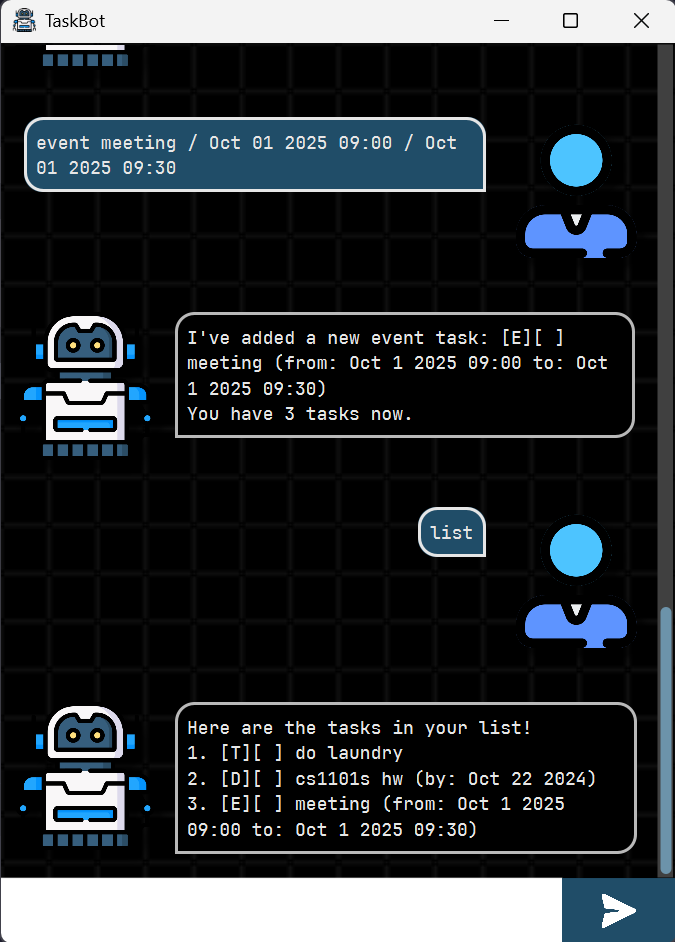
Adds an event task to the list. An event task has a description, a start time, and an end time. By default, a newly added task is not done.
Format: event DESCRIPTION / START_TIME / END_TIME
The time can be in the following formats:
YYYY-MM-DD HH:MMYYYY-MM-DDMMM DD YYYY HH:MMMMM DD YYYY
Examples:
event project meeting / 2025-09-15 14:00 / 2025-09-15 16:00event teaching session / 2025-09-15 / 2025-09-15event lecture / Jun 13 2025 14:00 / Jun 13 2025 16:00event tutorial / Jun 13 2025 / Jun 14 2025
Listing all tasks: list
Lists all tasks in the list.
The tasks will be displayed in the order they were added, assuming no sorting has been applied.
All the corresponding user-controllable details of each task will be displayed, e.g.
- Index number
- Task type (Todo[T], Deadline[D], or Event[E])
- Status (done or not done)
- Description
- Time (if applicable)
Marking a task as done: mark
Marks a task as done. The index refers to the index number shown in the list command.
Marked tasks will be shown with a cross ([X]) symbol.
Already-marked tasks will remain marked.
Format: mark INDEX
Example: mark 2
Unmarking a task as not done: unmark
Marks a task as not done. The index refers to the index number shown in the list command.
Unmarked tasks will be shown with an empty bracket ([ ]) symbol.
Already-unmarked tasks will remain unmarked.
Format: unmark INDEX
Example: unmark 2
Deleting a task: delete
Deletes a task from the list. The index refers to the index number shown in the list command.
Deleted tasks will be permanently removed from the list.
Note: Indexes of tasks may change after deletion. Make sure to use the
listcommand to check the current indexes of tasks.
Format: delete INDEX
Example: delete 2
Finding tasks by keyword: find
Finds tasks that contain the given keyword. The search is case-insensitive.
Partial matches will be returned.
For example, searching for “book” will return tasks with descriptions like “read book” and “book flight”.
Format: find KEYWORD
Example: find book
Sorting tasks by type: sort
Sorts tasks by specific parameters.
Format: sort [PARAMETER]
Possible parameters:
alphabetical: Sorts tasks in alphabetical order by description.time_created: Sorts tasks by the time they were created (oldest to newest).deadline: Sorts tasks by their deadlines (earliest to latest). Event tasks will use their start time. Tasks without deadlines are listed at the end.is_done: Sorts tasks by their completion status (not done first, then done).
Example: sort deadline
Saving tasks to file: save
Saves the current list of tasks to a local file.
By default, the file is named tasks.txt and stored in the directory ./data.
Exiting the program: bye
Exits the program. Tasks will be saved automatically before exiting. Similar behaviour occurs when you manually close the application using the GUI.
This is an individual project for CS2103T 25/26 S1.
Last updated on 18/9/2025